How to capture leads at trade shows: 15 methods that work
To capture leads at trade shows, combine several methods: book meetings before the show, give visitors more than one way to leave their details on the stand, note the need on the spot, then follow up within 48 hours. Here are fifteen methods, with the effort, equipment and data each one brings.
For the full picture, read the complete guide: trade show lead generation.
Before the show
A show is prepared before the doors open. Two methods fill your diary so you do not start from zero.
1. Book meetings. Write to your customers and prospects as soon as you have a list of attendees, whether from the organiser or from your own contacts. Offer a specific time slot, not a vague "come and see us". You arrive with a list of people you have already identified.
2. Open a registration or booking page. A simple page, reachable by a link and a QR code on your invitations, with a short form: name, company, email, preferred slot. Visitors who register become leads before the show begins.
For both methods, state two things from the first form: the visitor's consent, and the purpose of the data collection.
On the stand
This is where most of it happens. The methods below combine well: a team often uses four or five of them depending on the time of day.
3. Display a QR code on the stand. It leads to a short form. It works when the whole team is busy, because visitors help themselves. Put it at eye level, on the banner, the counter and the team's badges.
4. Share your digital card by QR code. The visitor opens it in their browser, saves your details and leaves theirs in the card's form. Nothing to install on their side.
5. Share your card by NFC. If the visitor has a compatible phone, they hold it against an NFC tag and the card opens. Piktechs does not sell a physical NFC card: you link to your card an NFC tag or card you get elsewhere. NFC is an extra way to share, and the QR code stays the base.
6. Scan paper business cards. You photograph the card you are handed. The business card scanner fills in the fields, you check and save. It suits visitors who would rather not fill in a form.
7. Use a short form. Four or five fields at most, on a tablet or the rep's phone. Every extra field costs you answers.
8. Offer a demo. A ten-minute demo asks for a name and an email to send a summary. It is an exchange, not a hurdle, and the conversation tells you the need.
9. Run a GDPR-compliant prize draw. A draw can attract poorly qualified contacts. If you run one, it needs rules, explicit and separate consent for any marketing, and limited data. Pick a prize related to your offer so that you keep mostly relevant visitors.
10. Offer a downloadable resource. A guide or product sheet reachable by QR code, in exchange for an email address. The visitor leaves with something and you leave with a contact.
11. Use the organiser's badge scanner. It identifies visitors fast. It does not replace the conversation. See the article on the trade show badge scanner to decide whether to rent one, and the one on lead retrieval for how it works.
12. Run a workshop or mini talk at the stand. A short session draws a small group. You collect contacts by QR code at the door or at the end.
13. Enter a contact by hand. For meetings in the aisles and at dinners, with no card and no form: name, email and a note, entered while it is fresh.
14. Put your card's QR code on your badge or clothing. Every rep becomes a capture point, including away from the stand.
15. Swap introductions with neighbouring exhibitors and partners. A recommendation from a complementary exhibitor, with the person's card or QR code, gives you a contact who has already been introduced.
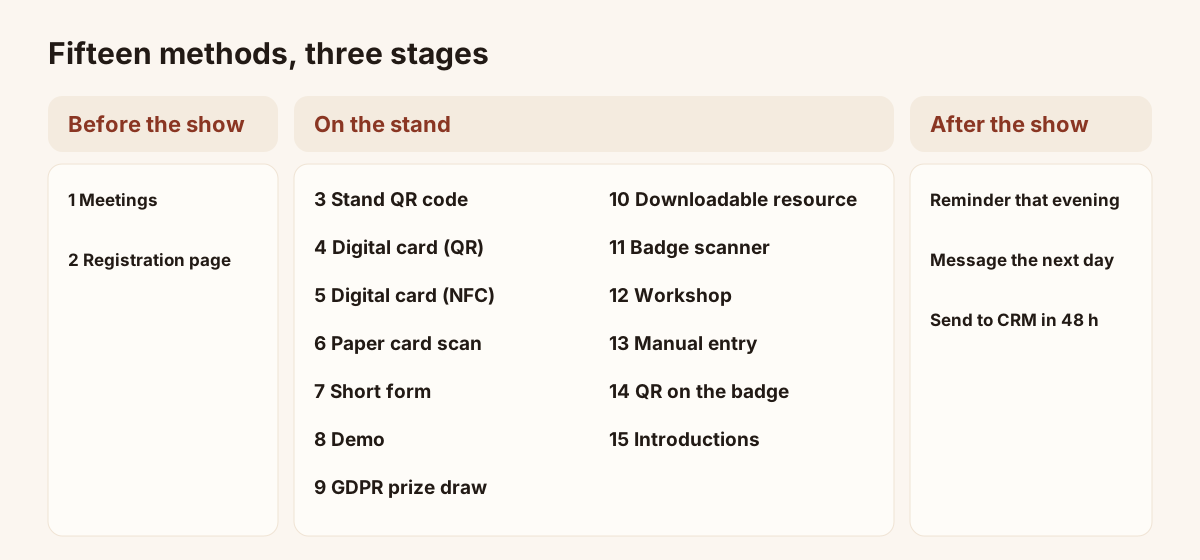
The fifteen methods spread over the three stages of a show.
The table of the fifteen methods
Effort is a qualitative estimate for a team starting out. It depends on how you are organised.
| No. | Method | Effort | Equipment | Data obtained |
|---|---|---|---|---|
| 1 | Meetings before the show | Medium | Email, calendar | Name, company, slot, context |
| 2 | Registration page | Medium | Web page, QR code | Name, company, email, slot |
| 3 | QR code on the stand | Low | Printed poster | Form fields |
| 4 | Digital card by QR code | Low | Phone | Visitor's details and answers |
| 5 | Digital card by NFC | Low | Phone, NFC tag | Visitor's details and answers |
| 6 | Paper card scan | Low | Phone | Name, title, email, phone from the card |
| 7 | Short form | Low | Tablet or phone | Form fields |
| 8 | Demo | High | Demo station, time | Need, contacts involved, timeline |
| 9 | Prize draw | Medium | Rules, prize | Email, consent |
| 10 | Downloadable resource | Medium | Document, QR code | Email, company |
| 11 | Badge scanner | Low | Device or licence | Visitor's registration record |
| 12 | Workshop at the stand | High | Space, host | Group contacts, questions asked |
| 13 | Manual entry | Medium | Phone | Name, email, note |
| 14 | QR code on the badge | Low | Printing | Visitor's details and answers |
| 15 | Introductions between exhibitors | Low | None | Introduced contact, context |
Qualify on the spot
A contact without context cannot be followed up. Within the hour after a conversation, note three things: the person's need, their deadline and your commitment. By the end of the day that memory is already blurred.
With Piktechs, you ask your own questions on the form and add a priority, tags, a note or a voice note right after the exchange. Voice notes are recorded, not transcribed. Add the show's name as a tag to find all the event's leads later. A lead captured without signal is kept on the device, then sent as soon as the connection returns.
Piktechs does not read organiser badges. If you rent a scanner, the two lists meet in your CRM or a spreadsheet, with the email as the common key. The trade show lead capture page describes the whole flow.
After the show: follow up within 48 hours
Follow-up should stay close to the conversation. Aim for the two days after the show ends, before the visitor has heard from your neighbours on the floor.
- The same evening, set a follow-up reminder on the priority leads.
- The next day, write a short message that picks up the points discussed, using the note taken on site.
- Within two days, send the leads to your CRM, filtered by the show's tag, or export them as CSV.
Piktechs sends leads to HubSpot or Odoo, and to other tools through Zapier and Make, with the source, answers and notes attached. CSV export is available at any time.
Frequently asked questions
What is the most effective way to capture leads at a trade show?
No single method is enough. A digital card by QR code, a paper card scan and a short form cover most visitors with just a phone. Add the badge scanner if traffic is very heavy.
Do you need consent to collect contacts?
Yes, as soon as you collect personal data for marketing. Consent should be clear and recorded with the lead. Piktechs records GDPR consent with each lead.
How soon after the show should you follow up?
As early as possible, ideally within 48 hours. The longer you wait, the more the conversation fades and the more your competitors gain.
Can you capture leads without equipment?
Yes. A phone is enough to share a digital card, scan paper cards and enter contacts. The stand's QR code can be printed on a simple poster.
Read next
 Guide
Trade show lead generation: the complete guide
Trade show lead generation, step by step: prepare the stand, capture leads, qualify on the spot, handle consent, sync to your CRM, follow up in 48 hours.
 Article
Lead retrieval at trade shows: definition, how it works, costs
Lead retrieval is the contact-capture service an organiser sells to exhibitors. See how it works, how it is priced and which data it leaves out.
 Article
Trade show badge scanner: rent it or do without?
How a trade show badge scanner works, the visitor data it leaves out, and a checklist to decide whether to rent it, complete it or skip it.
 Article
Conference lead capture without a booth
Speaker, attendee or sponsor: how to capture leads at a conference with no booth, using a QR code, a digital card and a follow-up within two days.
 Article
Lead Capture Software: A Buyer’s Guide by Criteria
Choose lead capture software: five families of tools compared, ten criteria as a checklist, and a trial on one event. No brands, only points to test.
 Article
Trade show checklist: how to prepare, step by step
A trade show checklist by period: three months out, one month, the week before, each show day and after. Goals, team, lead capture and follow-up.
Equip your team before the next show
Team gives each rep cards, forms and Lead Scanner, with lead assignment and CRM sync. 14-day trial.