Trade show badge scanner: rent it or do without?
A badge scanner reads the code on a visitor's badge and gives you the contact details they entered at registration. It is worth renting if you expect heavy traffic and the organiser provides a complete export. It tells you nothing about the visitor's need: that part has to be captured another way.
For the full picture, read the complete guide: trade show lead generation.
How a badge scanner works
Each visitor gets a badge with a barcode, a QR code or a chip. The code usually holds nothing more than an identifier. When you scan it, the organiser's system matches that identifier to the visitor's registration record: name, company, job title, email, sometimes a phone number.
The scanner comes in two forms. Either a handheld device rented for the duration of the show, or an organiser app installed on your own phones and activated by a licence. In both cases the data sits in the organiser's system first. You get it through an export, during or after the show depending on the terms.
The organiser's lead retrieval offer
The offer is described in the exhibitor manual, often under the name lead retrieval. Before you sign, note four things from that manual:
- The format: device, app, or both, and how many units are included.
- The price: it varies from one show to the next and with the number of licences. Ask for the price per additional unit.
- The exported fields: some organisers pass on only name and company, others add email and phone.
- The export delay: in real time, every evening, or several days after closing.
That last point matters more than it seems. A list received a week after the show arrives when your visitors have already heard from the stands next to yours.
Information missing from the badge: need, deadline, decision maker
The badge answers the question "who is this?". It does not answer the questions that help you sell: their need, their deadline, the decision maker, your commitments. Those answers are in the conversation, and they fade fast. At the end of a show day, nobody remembers the need of the thirtieth scanned person.
Some scanners let you add a note or tick a few boxes. Check this during the demo: if it takes more than a few seconds, it will not get done when the stand is full.
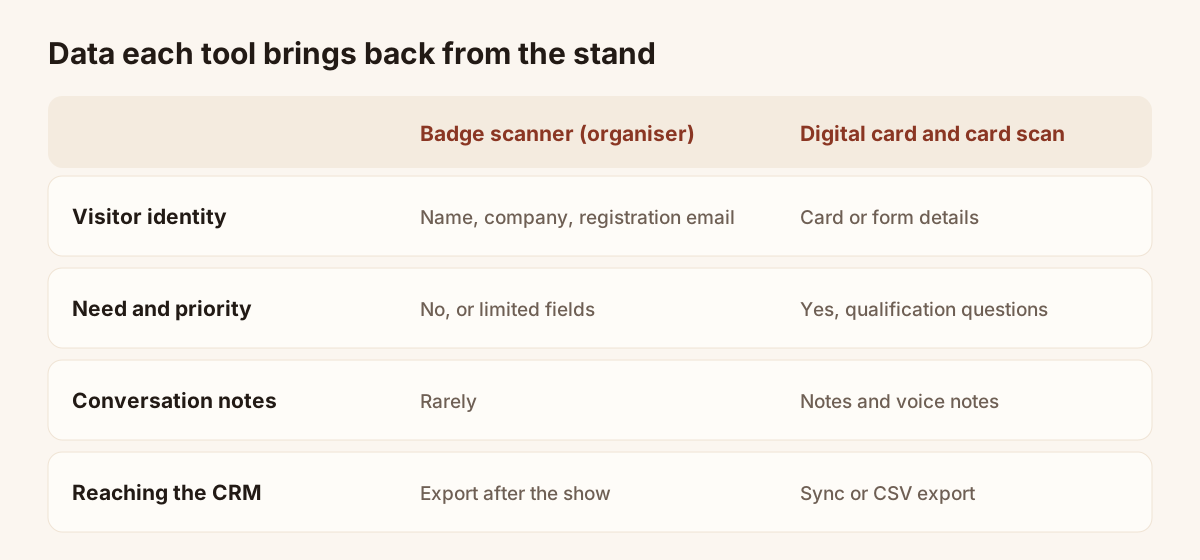
Data each tool brings back from the stand.
Alternatives without hardware
You can capture contacts without going through the badge. Three ways work with a phone alone:
- Scan the visitor's paper business card. The photo is read, the fields are filled in, you check them and save.
- Share your digital card by QR code. The visitor opens it in their browser and leaves their details in a form.
- Display a QR code on the stand that leads to the same form, for the moments when the whole team is busy.
None of these needs the organiser's agreement, and you have the data straight away. Their limit: the visitor must carry a card or agree to fill in a form. At a very busy show this is slower than a badge scan. The article on collecting leads at trade shows goes through these methods one by one.
Keep the scanner and complete the qualification
The two approaches work together. Many teams keep the organiser's scanner for identity and use a second tool for the qualification data the badge does not capture.
That is the case with Piktechs, and it should be said plainly: Piktechs does not read organiser badges. It captures a lead through your digital card or by scanning a paper card, then lets you qualify it on the spot with your own questions, a priority, a note or a voice note. The lead then goes to HubSpot or Odoo, or to another tool through Zapier and Make. A CSV export is always available.
In practice, on a stand: every visitor's badge is scanned with the organiser's scanner, and the visitors with whom the conversation is serious are also saved and qualified in the team's own tool. After the show, the organiser's export and your qualified leads both end up in your CRM, where the email address is used to match the two. The full flow is described on the trade show lead capture page.
Checklist before you rent
Answer these questions with the exhibitor manual in front of you:
- How many visitors do you expect on the stand per day? Beyond the volume the team can enter by hand, the scanner saves time.
- Which fields does the export contain? Without an email address, the list is no use for follow-up.
- When do you receive the export? Aim for the same day or the next.
- In which format? A CSV file imports into every CRM.
- How many devices or licences are included, and at what price beyond that?
- Does the scanner work without a network? Exhibition halls often have poor coverage.
- Can you add a note or a priority to each scan?
- Have visitors consented to their data being passed to exhibitors? The organiser should be able to confirm it.
If the export is late, short on fields or leaves no room for qualification, rent the minimum number of licences and capture the rest with your own tool. If you expect few visitors and long conversations, you can do without. To compare tools, see how to choose an event lead capture app.
Frequently asked questions
Is a badge scanner mandatory to exhibit?
No. It is an option sold by the organiser. You can exhibit without one and collect contacts by your own means: business cards, a form, a digital card.
Can you read badges with your phone camera?
Usually not. The badge code holds only an identifier, and only the organiser's system can link it to the visitor's details. You need their scanner or their licensed app.
Does Piktechs read organiser badges?
No. Piktechs captures leads through your digital card and by scanning paper cards, then helps you qualify them. For badges, you keep the organiser's scanner.
When should you follow up scanned contacts?
As early as possible, ideally within two days of the show, while the conversation is still fresh in the visitor's mind. This is why the organiser's export delay is a selection criterion.
Read next
 Guide
Trade show lead generation: the complete guide
Trade show lead generation, step by step: prepare the stand, capture leads, qualify on the spot, handle consent, sync to your CRM, follow up in 48 hours.
 Article
Lead Capture Software: A Buyer’s Guide by Criteria
Choose lead capture software: five families of tools compared, ten criteria as a checklist, and a trial on one event. No brands, only points to test.
 Article
Trade show checklist: how to prepare, step by step
A trade show checklist by period: three months out, one month, the week before, each show day and after. Goals, team, lead capture and follow-up.
 Article
Trade show follow up email: method and 5 templates
Trade show follow up email method: when to write, how to sort leads, five templates, a short phone script and a three-week follow-up sequence.
 Article
Digital Business Cards for Trade Shows: Capture Every Lead at Your Stand
Use digital business cards and a stand QR code to capture, qualify and sync trade show leads to your CRM, with no badge reader to rent.
 Article
How to choose an event lead capture app
Ten criteria and a scorecard to compare event lead capture apps: offline mode, card scanning, qualification, CRM sync, GDPR. Points to test, no brand list.
Equip your team before the next show
Team gives each rep cards, forms and Lead Scanner, with lead assignment and CRM sync. 14-day trial.