Digital business card app: the features to look for

A digital business card app builds your card online and shares it by QR code, link or NFC. Look for three things: the person you meet installs nothing, they save your contact in one tap, and you can edit your details without sharing again. Everything else depends on whether you work alone or in a team.
For the full picture, read the complete guide: how digital business cards work.
Core functions of a digital business card app
A digital card is a personal web page: your photo, job title, company, contact details and links. The app helps you build it, publish it and get it onto the phone of the person you are talking to.
There are three ways to share it. A QR code, which the other person scans with their camera. A link, which you send in a message or place in your email signature. An NFC tag, which opens the card when a phone touches it. In all three cases the card opens in the browser.
The tool must make the next step easy: the person saves your contact to their address book and, if you ask, leaves theirs. A card that looks good but cannot be saved is only something to look at.
Must-have features
These decide whether people keep using the tool or drop it after a week.
- Nothing to install for the recipient. The card opens in the browser of any phone. If the other person has to download something, many will not bother.
- Save to the address book. One button that creates the contact with name, photo, job title and links, on iPhone and on Android.
- Updates without sharing again. You change your number or role: the QR code, the link and the tag point to the same card, so they stay valid.
- One QR code and one link per card. You should be able to show the QR code on your phone or print it.
- A free plan that is enough to try. You publish a real card before paying anything.
- Clear data hosting. Know where the contact details you collect are stored and whether you can export them.
Useful features, depending on how you work
These matter depending on whether you work alone or in a team, at trade shows or at client sites.
- A form in return, so the visitor leaves their details and answers a question or two.
- Statistics: card views, saved contacts, link clicks.
- A custom address or your own domain.
- Several cards, for example one per activity or per salesperson.
- Team branding: colours, logo and layout identical across every card.
- Export of the contacts you collect, or a sync with your CRM.
Gimmicks: do not pay extra for them
Some options impress in a demo and are rarely used afterwards: heavy animations, dozens of themes of which you will use one, video backgrounds that slow the card down on a weak connection. A card that is slow to load loses the contact at the moment they are ready to save it.
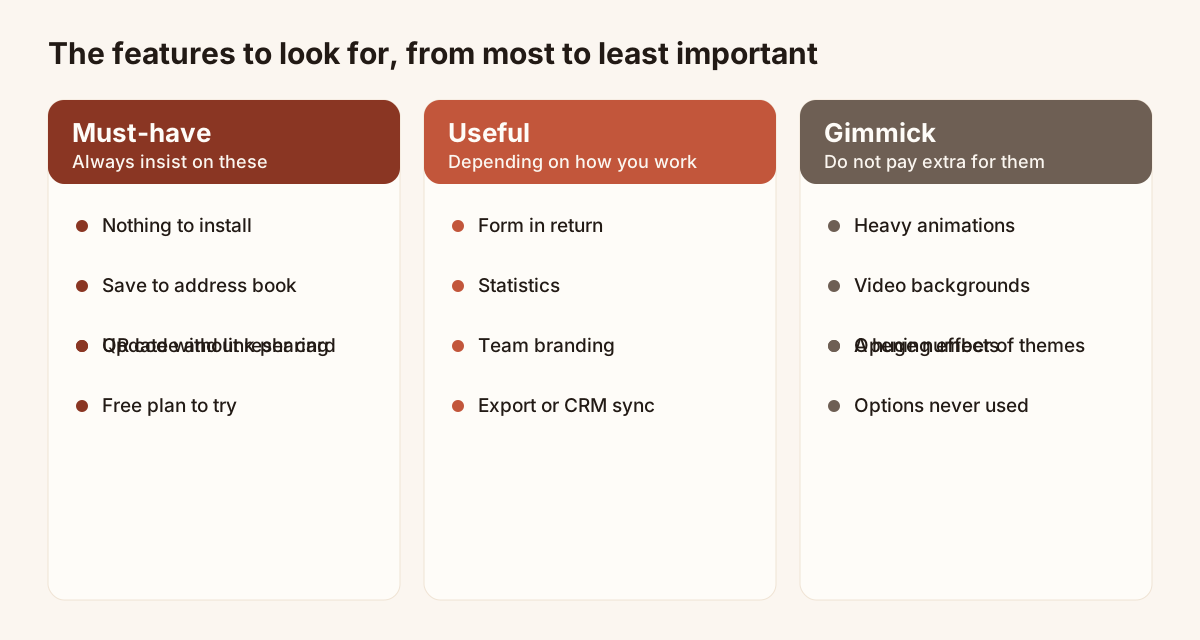
Three levels of features, from the most important to the least.
The table below turns the same criteria into a grid you can tick against any offer.
| Feature | Must-have | Useful | Gimmick |
|---|---|---|---|
| Opens in the browser, no install | Yes | ||
| Save to the address book | Yes | ||
| Update without sharing again | Yes | ||
| QR code and link for each card | Yes | ||
| Free plan to try | Yes | ||
| Form in return | Yes | ||
| Statistics | Yes | ||
| Team branding and shared cards | Yes | ||
| Export or CRM sync | Yes | ||
| Animations and video backgrounds | Yes | ||
| A very large number of themes | Yes |
App or plain link: the recipient’s side, no app to install
The question that matters is not “is the app in the store?” but “how many steps does the person in front of me have to take?”. With a web card, they scan or tap, the page opens, they save. Nothing to download, no account to create.
Piktechs works this way: you create and edit your cards in the browser, on phone or computer, and the recipient installs nothing. Your contact is saved in one tap as a vCard, on iOS and on Android.
Do not pick a tool that needs an app on both sides. Your card has to work with people who have never heard of it.
Business card app for a team: shared workspace and follow-up
In a group, the question is no longer the nice-looking card but consistency and follow-up. Look for a shared workspace where each salesperson has their own card while colours, logo and layout stay the company’s. Look also at where the collected contacts go: which salesperson gets them, and how do they reach your CRM?
For this, Piktechs offers team branding, roles and lead assignment on the Team plan, and sync with HubSpot and Odoo, or with other tools through Zapier and Make. For the overview, see the page on digital business cards.
Free or paid
A free plan should be enough to check that the tool fits. With Piktechs, the Free plan gives you one live card, with no time limit and no credit card. Drafts are unlimited.
Pro (EUR 9 a month, or EUR 84 a year) becomes useful when you want five cards, a form, the Contacts list and statistics. Team (EUR 15 per seat per month, from 3 seats) is for teams that want shared branding and lead assignment. A 14-day trial is available on Pro and Team. Details are on the pricing page.
Before paying anywhere, ask three questions. What happens to my card if I stop? Can I export my contacts? Does the price change with the number of cards?
To choose and get started
To compare solutions criterion by criterion, read how to choose the best digital business card. Once you have chosen, you can create a digital business card step by step from the browser.
Frequently asked questions
Do I need to install an app to have a digital business card?
Not necessarily. A web card is created and edited in the browser. With Piktechs you work from the browser on your phone or computer, and the person who receives your card installs nothing.
Does the person who receives my card need the same app?
No. They open your card in their browser after scanning a QR code, tapping an NFC tag or clicking a link. They save your contact to their address book without creating an account.
Is a free digital business card app enough?
For one personal card, yes. The Piktechs Free plan gives you one live card. You need Pro for several cards, forms, Contacts and statistics.
What happens to my card if I change my number?
You edit it, and the change is live as soon as you save. The QR code, the link and the NFC tag point to the same card, so there is nothing to reprint or resend.
Read next
 Guide
How Do Digital Business Cards Work? QR Codes, NFC, Links and vCards Explained
QR code, NFC, link or vCard: see how digital business cards work, how contacts get saved on iPhone and Android, and how leads follow.
 Article
A digital business card for field sales reps
Functions of a field sales rep’s digital business card: share in meetings, bring back a form, trigger follow-ups and be managed across the whole team.
 Article
Are Digital Business Cards Worth It? Costs, ROI, Pros and Cons
Paper vs digital business cards: costs, a method to work out ROI with your own numbers, pros and cons, and who should switch.
 Article
What Is a Digital Business Card? The Complete Guide
Definition of a digital business card, how it works and how it compares to paper. Plus how to create your own free card in minutes.
 Article
How to Create a Digital Business Card on Android
Create a digital business card on Android with the Piktechs app or your browser, share it by QR code, link or NFC tag and keep the contacts you meet.
 Article
How to Create a Digital Business Card on iPhone
Create a digital business card in Safari on your iPhone, add it to the Home Screen and share it by QR code, link or NFC tag. No app needed.
Create your digital card
The Free plan includes one live card. No app needed for the people who receive it.