How to choose an event lead capture app
A good event lead capture app works without a network, reads paper cards, asks your qualification questions and sends the lead to your CRM. Ten criteria let you compare tools without a list of brands. A scorecard at the end of the article gives each tool a mark.
For the full picture, read the complete guide: trade show lead generation.
Core functions of a lead capture app for trade shows
On a stand, the time per visitor is counted in minutes, sometimes in seconds. The app has one job: record a contact and the content of the conversation, in a few taps, then pass everything to the team's own tools.
Three situations put it to the test: a hall with no signal, a full stand where nobody has time to type, and the return to the office, when you have to follow up without losing context. A tool that fails on any one of the three loses leads, or loses their value.
There are two families. Organiser tools read the badge (lead retrieval) and give you the visitor's identity. Independent apps capture through a card, a form or a scan of a paper card and let you qualify on the spot. This article compares mainly the second family, and nothing stops you from using both.
The 10 criteria
Here are the ten points to check, with the reason each one matters.
- Offline mode. Exhibition halls often have poor coverage. Leads must be kept on the device and sent when the network returns.
- Business card scanning. Many conversations end with a paper card. Reading it should fill in the fields, with a check before saving.
- Form. The visitor should be able to leave their details themselves, from a QR code or a digital card.
- Qualification. Your questions, a priority, tags and notes, without leaving the capture screen.
- Voice notes. Useful when your hands are full. Check whether they are transcribed or only recorded. In Piktechs they are recorded.
- CRM sync. Which tools, natively or by webhook, and the data that arrives with the lead: source, answers, notes.
- GDPR and hosting. Consent should be recorded with each lead and the data hosted in the European Union.
- Temporary seats. You reinforce the team for one show. Can you add seats before and remove them after, without a long commitment?
- Export. A CSV export should always be possible, with a choice of selection.
- Ease of start. A rep should enter a first lead within minutes, without training, from their phone.
In this list, criteria 1, 4 and 6 most often decide the choice. A tool that does not work offline or does not feed your CRM creates re-keying work after the show.
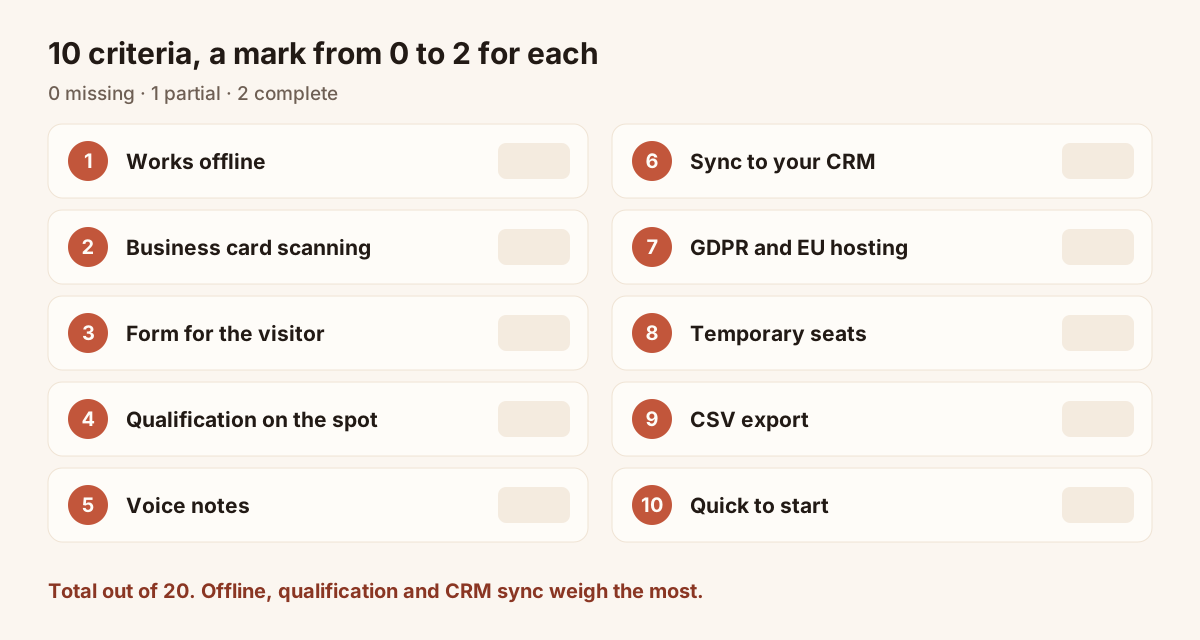
The ten criteria to mark from 0 to 2 for each tool.
The scorecard to fill in
For each tool, give each criterion 0 (missing), 1 (partial) or 2 (complete). Add them up. A total out of 20 lets you rank the tools. Weight by hand if your show calls for it: double the offline mark if your stand is in a basement hall.
| Criterion | Question to ask | Tool A | Tool B | Tool C |
|---|---|---|---|---|
| Offline | Are leads kept without a network, then sent on their own? | |||
| Card scanning | Are fields filled in, with a check before saving? | |||
| Form | Can the visitor fill it in alone from a QR code? | |||
| Qualification | Are questions, priority, tags and notes on the same record? | |||
| Voice notes | Recorded or transcribed? Where are they stored? | |||
| CRM sync | Which tools, and what does the sent lead contain? | |||
| GDPR, hosting | Is consent recorded? Where is the data hosted? | |||
| Temporary seats | Can you add and remove seats without a long commitment? | |||
| Export | CSV available, with a selection? | |||
| Ease of start | First lead within minutes, no training? | |||
| Total out of 20 |
Questions to ask the vendor
The scorecard covers features. These questions cover failure cases and breakdowns:
- What happens to a lead entered without a network if the phone restarts before it syncs?
- Who owns the data, and how do you get it out if you stop the subscription?
- Which lead fields arrive in the CRM, and can you map them to your own properties?
- Does the tool read the organiser's badges? If not, how do you combine it with the organiser's export?
- How many seats do you have to take at minimum, and can you remove them after the show?
- How long is the trial, and does it need a payment card to start?
As an example, Piktechs does not read organiser badges. It offers a 14-day trial on Team. You can keep the organiser's scanner and match the two lists in your CRM by email. It sends leads natively to HubSpot and Odoo, and to other tools through Zapier and Make. There is no native Salesforce connector. The details are on the trade show lead capture page, and the prices on the pricing page.
Common traps
- Choosing on the demo, not on the stand. A demo happens in a quiet room with a network. Test in show conditions: standing up, one hand free, no signal.
- Forgetting the return to the office. A lead badly described at capture cannot be rescued later. Look at the fields the CRM receives, not only at the capture screen.
- Multiplying tools. Three apps on one stand give three lists to merge. Limit yourself to one capture tool, plus the organiser's scanner if you rent it.
- Neglecting consent. Without recorded consent, a sales follow-up is on shaky ground. Check how it is tracked.
- Taking seats for the year. For a one-off show, a subscription with no long commitment avoids paying for unused access.
On the scanner side, the article on renting a badge scanner gives a checklist. For the methods to set up on the stand, see 15 ways to capture leads at trade shows.
Frequently asked questions
Do you need an independent app if the organiser provides a scanner?
Not necessarily, but the scanner captures only the visitor's identity. If you want to note a need, a priority or a comment, you need a second tool or a separate entry.
Does an event lead capture app work without a network?
It should. Check that leads are kept on the device and sent when the network returns. In Piktechs, leads captured without signal are sent when the connection is back.
Do visitors have to install an app?
No, and this criterion matters. The visitor opens your card in their browser and saves your details. In Piktechs, your reps use the tool in their phone's browser.
How many criteria must a tool meet?
No threshold fits everyone. Offline mode, qualification and CRM sync are the three not to give up. The rest can be weighted according to your show and the size of the team.
Read next
 Guide
Trade show lead generation: the complete guide
Trade show lead generation, step by step: prepare the stand, capture leads, qualify on the spot, handle consent, sync to your CRM, follow up in 48 hours.
 Article
Lead retrieval at trade shows: definition, how it works, costs
Lead retrieval is the contact-capture service an organiser sells to exhibitors. See how it works, how it is priced and which data it leaves out.
 Article
How to capture leads at trade shows: 15 methods that work
Fifteen ways to capture leads at trade shows, before, during and after: effort, equipment and data for each, plus follow-up within 48 hours.
 Article
Conference lead capture without a booth
Speaker, attendee or sponsor: how to capture leads at a conference with no booth, using a QR code, a digital card and a follow-up within two days.
 Article
Trade show badge scanner: rent it or do without?
How a trade show badge scanner works, the visitor data it leaves out, and a checklist to decide whether to rent it, complete it or skip it.
 Article
Lead Capture Software: A Buyer’s Guide by Criteria
Choose lead capture software: five families of tools compared, ten criteria as a checklist, and a trial on one event. No brands, only points to test.
Equip your team before the next show
Team gives each rep cards, forms and Lead Scanner, with lead assignment and CRM sync. 14-day trial.