Digital Business Cards for Teams: Brand, Manage and Track Every Card
Roll out digital business cards to a team in four steps: invite members, set a locked brand kit, assign cards from a shared pool, and send each lead to the rep who owns the card. Piktechs Team costs EUR 15 per seat per month, from 3 seats, with 5 cards per seat.
This article explains the set-up and the decisions behind it. If you are new to the format, start with how digital business cards work.
How to set up digital business cards for employees
A team set-up has five parts. Do them in this order, because each one depends on the one before.
- Create the team workspace. Subscribe to Team, with a minimum of 3 seats, and open the Team area.
- Invite members. Open "Team" then "Members", invite each colleague by email, and they join through the invitation link.
- Set the brand kit. Colours, logo and style are fixed once for everyone (next section).
- Assign cards. Cards come from one shared pool. You assign a card to each member and add seats whenever you need more.
- Turn on the form. One qualification form, applied to every card, so that every rep captures leads the same way.
Employees do not start from a blank page. Each rep opens a card that already carries the company's brand, then fills in their own name, photo, job title and contact details. Publishing takes one click.
If you have many people to onboard, Team can import cards from a CSV file, which creates one card per row. The import stays within your plan's limit of live cards.
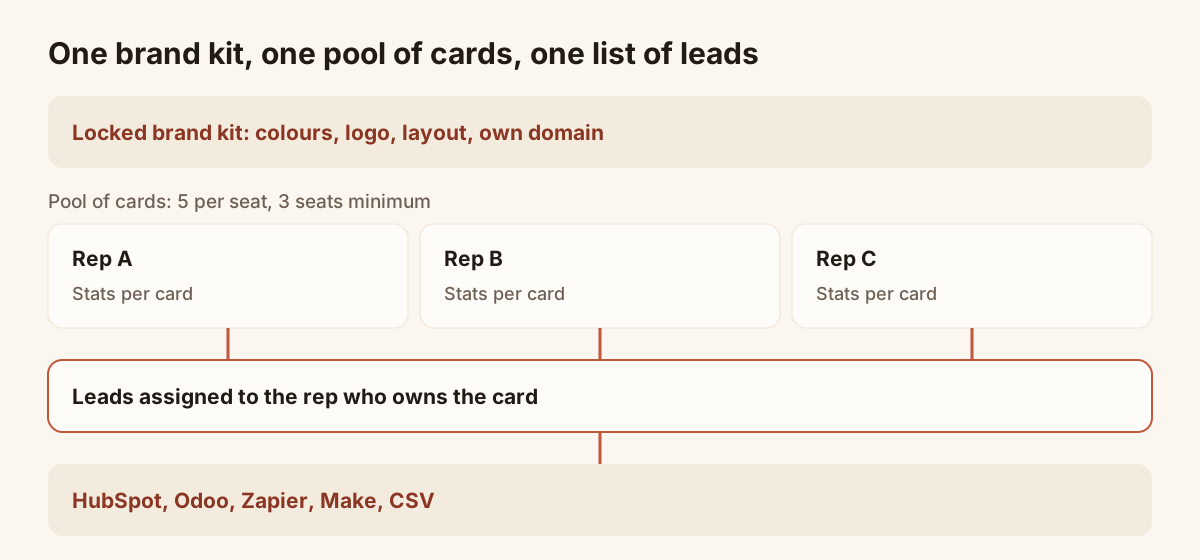
One brand kit, one pool of cards, one list of leads.
How much do digital business cards cost per employee
Team costs EUR 15 per seat per month, with a minimum of 3 seats. Billed yearly, the price is EUR 144 per seat per year. A seat includes 5 live cards, so one employee can hold a card per role or per language. Drafts are unlimited and do not count.
| Team size | Seats billed | Monthly price |
|---|---|---|
| 3 people | 3 | EUR 45 |
| 5 people | 5 | EUR 75 |
| 10 people | 10 | EUR 150 |
A seat added in the workspace is billed pro rata at once. A removed seat takes effect at the end of the paid period. Both steps are done from the workspace, at any time.
Below three people, Pro (EUR 9 per month, 5 live cards) is the plan to choose. If several teams need to share a card pool under one contract with invoice billing, ask for an Organisation quote on the pricing page. Both Pro and Team start with a 14-day trial for a first subscription, with no commitment.
How to keep business cards on brand across a team
Cards drift when each person edits their own: a different blue, an old logo, a banner nobody approved. The brand kit stops this.
- Locked colours, logo and layout. Once locked, a rep edits their own details but not the design.
- One change, every card. When the company rebrands, you update the design once and every card follows. The QR code, the link and the NFC tag of each rep keep pointing to the same card, so nothing is reprinted. The article on how to update a digital business card goes through it.
- Your own domain. Team lets you host cards on an address of your company, such as cards.your-company.com.
- Shared forms. Forms created in a team workspace belong to the team: every member can use them, and admins can edit them.
With the brand kit, a rep corrects a phone number without waiting for a designer, and nobody can change the logo.
What happens to a digital business card when an employee leaves?
Settle this before the first departure. The site states four facts.
- Cards are assigned from a shared pool that belongs to the team workspace.
- The QR code, the link and the NFC tag of a card keep pointing to the same card, and edits are live instantly.
- Admins see every lead of the team, and each lead is assigned to a member or a group.
- A removed seat takes effect at the end of the paid period.
The reassignment of a departed rep's card to a new hire is not described on the site, so check it before you rely on it. Ask for a short demo, or test it during the 14-day trial with a test member. Settle three points: where the card goes, the fate of its link, and who keeps the leads.
A good habit is to treat departure as a checklist item of the HR process: remove the member, reassign their open leads to a colleague, then take the card offline or reassign it. Taking a card offline deletes nothing, and you can publish it again later.
How to track business card leads per sales rep
A card is useful if you can tell which leads it brought. In a team, three views answer that.
- Stats per card. Views, saves and new leads for each card, plus top links and clicks. On Team, the analytics cover the whole team.
- Leads assigned to members. Each lead goes to a member or a group, so a rep sees their own leads first. Roles and permissions set the visibility of leads for each member.
- One shared list. In Contacts, admins see every lead with its source, tags, notes and the answers to your form. You can filter by date and by member, and export the selection as CSV.
Add a tag on each lead so that a campaign or a show is easy to find. Analytics and Contacts are Pro and Team features.
The leads then need a destination. An owner or admin connects HubSpot, Odoo, Zapier or Make in "Team" then "Integrations", and new leads are sent automatically. Your CRM stays the system of record, and Piktechs feeds it with the source, tags, notes and form answers. There is no native Salesforce connector: use Zapier or Make. For trade shows, the article on digital business cards for trade shows shows the same tracking applied to a stand.
Roles: access for each member
Decide roles before you invite anyone. Team has roles, groups and permissions, and they set lead visibility for each member. Three facts from the product:
- Admins see every lead and can edit the team's forms.
- An owner or admin connects the CRM.
- Members are invited by email and join through the invitation link.
Keep the number of admins small, for example one from marketing and one from sales.
Mistakes to avoid when rolling out cards to a team
Most problems come from the set-up, not from the tool.
- Letting everyone create their own card from scratch. You get ten designs. Start every rep from the branded card.
- Skipping the form. A card without a form gives you a saved contact and no answers. Set two or three questions once, and apply them to every card.
- Forgetting the CRM. Leads that stay in Contacts are fine for a small team, and a CSV export covers it. For a larger team, connect HubSpot, Odoo, Zapier or Make on day one, so leads reach the system your sales managers already use.
- Buying seats for people who will not use a card. A seat is billed monthly. Start with the reps who meet prospects, and add seats when others ask.
- Ignoring departures. Put the leaving step in the HR checklist from the start, as described above.
- Printing before checking. Test each QR code on a phone before printing it on a banner, a badge or a leaflet.
The first week of a new rep
A new rep should need one session. Invite them by email, let them join through the invitation link, and open their branded card. They fill in name, photo, job title and contact details, publish, and test the QR code on their own phone. They then open the form, send themselves a test lead and set a priority and a reminder on it. From the second day, they share the card at the end of every meeting. Their leads appear in the shared list with the rest of the team's, and the manager sees the card's views and saves in the stats.
Rollout checklist
Use this list over two weeks. Each line is a decision or a task with one owner.
Before inviting anyone
- Choose the owner and one backup admin.
- Collect the brand assets: logo, colours, banner.
- Write the 2 or 3 questions of the qualification form.
- Decide which CRM receives the leads, and who connects it.
Set-up
- Create the workspace and lock the brand kit.
- Set up your own domain if you want one.
- Create the form and apply it to the cards.
- Create one test card and open it on an iPhone and an Android phone.
Launch
- Invite members by email and ask each to fill in their details.
- Publish the cards and check each public page.
- Share the QR code in each email signature and on printed material.
- Run one test lead from a card to the CRM.
First month
- Review stats per card after two weeks.
- Reassign leads that have no owner.
- Remove unused seats at the end of the period.
- Write the departure step into your HR checklist.
Frequently asked questions
Do employees need to install an app for their card?
Reps use the Piktechs app to capture and follow up. The people they meet install nothing: the card opens in the phone's browser and the contact is saved in one tap.
Can we use our own domain for the cards?
Yes, on Team. You can host cards on an address of your company, such as cards.your-company.com. Pro offers a custom address, and the own domain is a Team feature.
How many cards does a seat include?
Five live cards per seat, taken from a shared pool. Drafts are unlimited and do not count.
Is there a trial?
Yes. Team and Pro start with a 14-day trial, reserved for a first subscription. Cancel before it ends and nothing is charged.
Can several teams share one contract?
Organisation is made for that: several teams share a card pool and one contract, with invoice billing. Ask for a quote. To compare tools before deciding, read the guide to the best digital business card apps, or see the digital business cards page.
Read next
 Guide
How Do Digital Business Cards Work? QR Codes, NFC, Links and vCards Explained
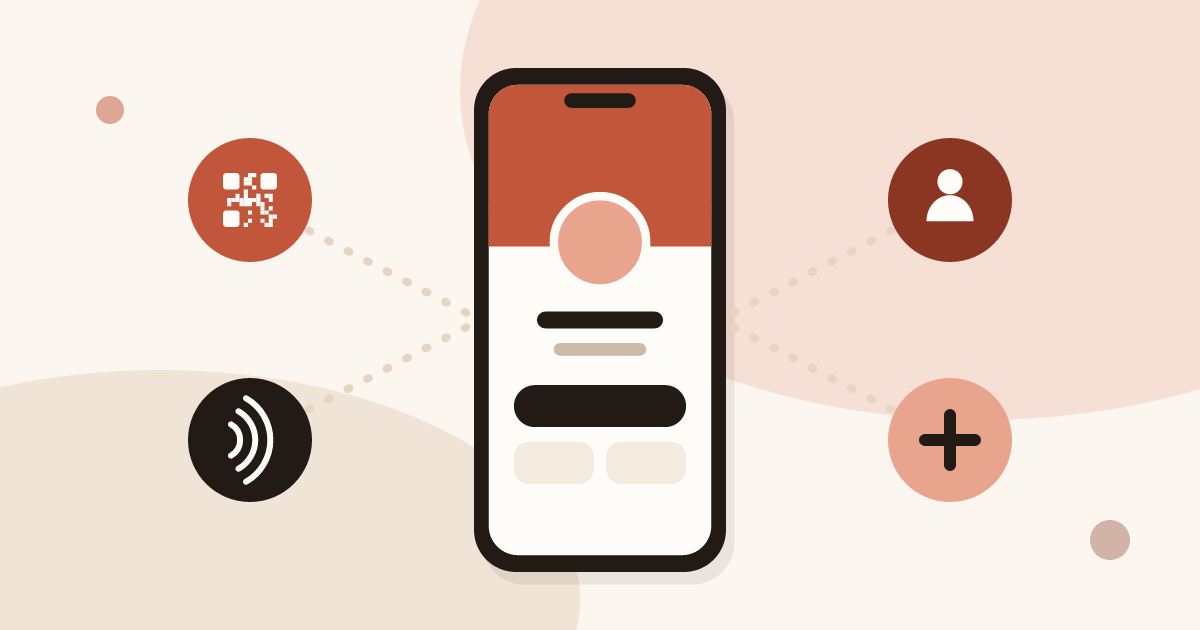
QR code, NFC, link or vCard: see how digital business cards work, how contacts get saved on iPhone and Android, and how leads follow.
 Article
Best Digital Business Card Apps, Compared Honestly
We compare the best digital business card apps on price, CRM sync, team features and GDPR, so you can pick the right one.
 Article
Digital Business Cards for Trade Shows: Capture Every Lead at Your Stand
Use digital business cards and a stand QR code to capture, qualify and sync trade show leads to your CRM, with no badge reader to rent.
 Article
Digital business card app: the features to look for
Which features a digital business card app must have, which are useful and which are gimmicks, with a table to check any offer against.
 Article
A digital business card for field sales reps
Functions of a field sales rep’s digital business card: share in meetings, bring back a form, trigger follow-ups and be managed across the whole team.
 Article
How to Create a Digital Business Card (Step by Step, Free)
Create a free digital business card in 5 steps: pick a layout, add your links, share it by QR code or NFC. No app needed for the people you meet.
Equip your team before the next show
Team gives each rep cards, forms and Lead Scanner, with lead assignment and CRM sync. 14-day trial.